TxHelpdesk

  • Login
  • Submit a Ticket
  • Knowledge Base
© 2026 TxHelpdesk
Knowledge Base
  • Knowledge Base
  • TxHelpdesk
  • How to Configure the Def…
How to Configure the Default Page as the Contact Listing Page
0 recommendations  | 14 views

Please follow the steps below to set the Contact Listing page as your default home page:

1. Log in to your profile in TxHelpdesk.

2. Click on the Gear (Settings) icon.

3. Locate the Login Home View dropdown menu.

4. Select Contacts from the dropdown options.
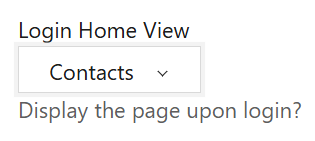
5. Save the changes by clicking on submit button.

Once configured, the Contact Listing page will automatically appear each time user logs in.

Did you find it helpful?
Share
Other TxHelpdesk Articles
  • How to forward a Ticket/Message inTxHelpdesk?
  • How to add preset replies?
  • How to download the report?
  • How to know if there is a new update on the …
  • How to relate a ticket with another ticket?
Categories
  • C - Tools
  • Chirp
  • CRM Integrations
  • General
  • Headset troubleshooting
  • TxChat
  • TxContact App
  • TxDialer
  • TxHelpdesk
  • TxRecord
  • TxReport
  • TxScreenCapture
  • TxSmartQ
  • TxTalk
  • TxTalk Web
  • User Manual