How to Configure DND in Smartq
1. Log in to SmartQ.
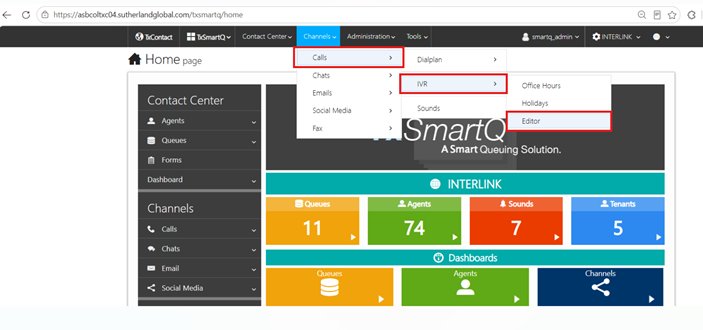
2. Navigate to Channels → Calls → IVR → Editor.
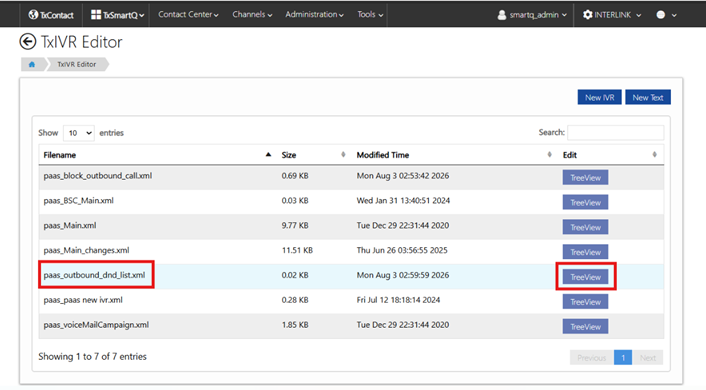
3. In the list of XML files, locate pass_outbound_dnd_list.xml and click the Tree View option.
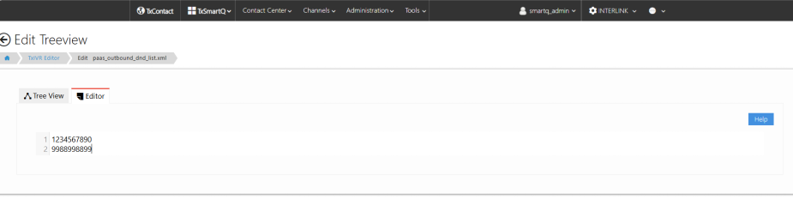
4. The file will open with two tabs: Tree View and Editor.
-> Switch to the Editor tab.
-> Enter the contact numbers that you want to add to the DND list.
-> Please note that each number should be entered in the next line.
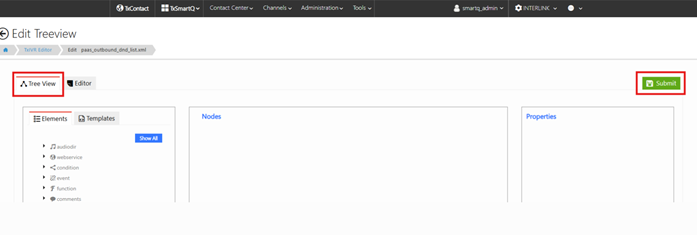
5. After adding all the required numbers, switch back to the Tree View tab.
6. Click Submit to save and apply the changes.
4. The file will open with two tabs: Tree View and Editor.
-> Switch to the Editor tab.
-> Enter the contact numbers that you want to add to the DND list.
-> Please note that each number should be entered in the next line.
5. After adding all the required numbers, switch back to the Tree View tab.
6. Click Submit to save and apply the changes.
Note :
- After clicking Submit, it may take around 2 minutes for the system to process the numbers.
- Once the processing is complete, the DND functionality will become effective.
- Once the processing is complete, the DND functionality will become effective.
Did you find it helpful?