Certificate Error in Chirp
Overview
Users may occasionally encounter a certificate warning message while using Chirp. The error typically appears when the installed Chirp application version is outdated and is attempting to access a server using an expired certificate.
Error Message
The following message may be displayed:
Server's certificate has expired.
If you wish so, you may continue with an unverified certificate.
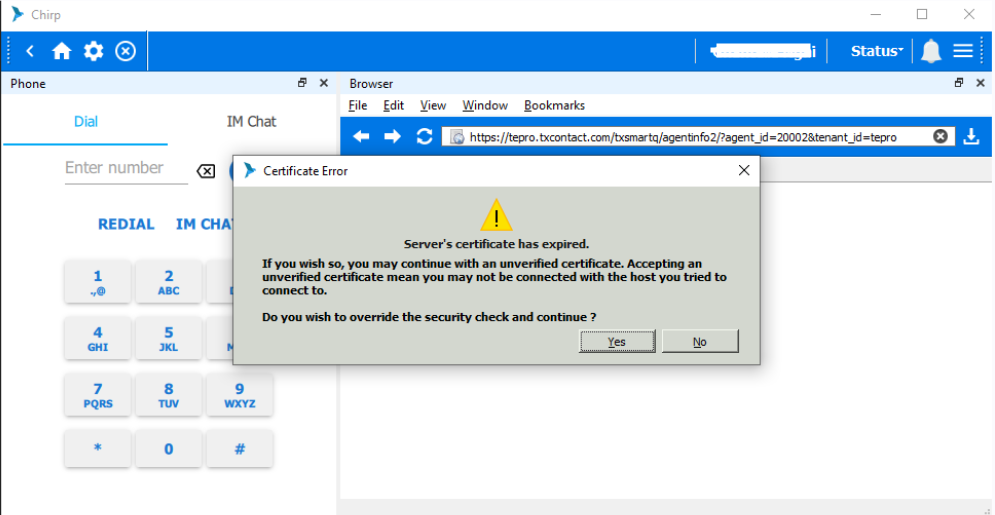
Symptoms
- Certificate Error popup appears when launching Chirp.
- Users are unable to proceed without responding to the prompt.
- Embedded browser pages within Chirp may not load correctly.
Immediate Workaround
Users can safely click "Yes" to continue using Chirp.
This action will allow the application to proceed and will not impact normal functionality.
This issue commonly occurs when:
- An older version of the Chirp application is installed.
- The application is using outdated certificates.
- The installed version has not been updated to the latest release.
Resolution
Step 1: Continue to Chirp
- When the Certificate Error popup appears, click Yes.
- Verify that Chirp loads successfully.
Step 2: Update Chirp to the Latest Version
To prevent the error from recurring, install the latest version of Chirp.
Installation Guide
Chirp Installation/Uninstallation Guide
click here:Chirp Installation Guide for Windows
Follow the instructions in the guide to:
- Uninstall the existing version (if required).
- Download the latest Chirp installer.
- Install the updated version.
- Restart the application.
Did you find it helpful?