How To Send Reset Password To The User By Admin ?
How to Send Reset Password Link to User by Admin – TXContact
Overview
This guide explains the steps for an Admin user to send a Reset Password Link to any user in the TXContact portal when the user is unable to log in or has forgotten their password.
Prerequisites
• Admin access to the TXContact portal
• User account must already be created and active in the system
Step 1: Login to Admin Portal
Login to the TXContact portal using Admin credentials.
Step 2: Navigate to User Management
Go to: Administration → Users
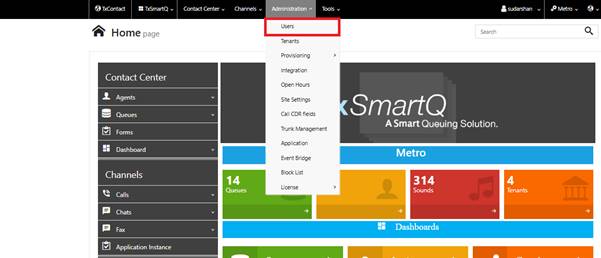
Step 3: Search for the User
Search using Username or Registered Email ID and select the required user.
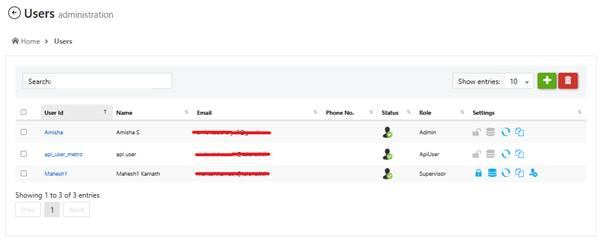
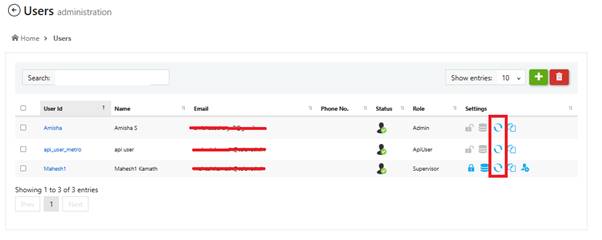
Step 4: Send Reset Password Link
Click on the below highlighted icon. The system will send a password reset link to the registered email address.
Step 5: User Resets Password
The user receives the reset link by email and can set a new password.
Important Notes
• Ensure the registered email address is correct
• Reset link may have limited validity
• Ask user to check Spam/Junk folder if email is not received
Troubleshooting
1. Verify configured email ID
2. Resend reset link
3. Check email service functionality
4. Contact Telenetix Support if issue persists
Overview
This guide explains the steps for an Admin user to send a Reset Password Link to any user in the TXContact portal when the user is unable to log in or has forgotten their password.
Prerequisites
• Admin access to the TXContact portal
• User account must already be created and active in the system
Step 1: Login to Admin Portal
Login to the TXContact portal using Admin credentials.
Step 2: Navigate to User Management
Go to: Administration → Users
Step 3: Search for the User
Search using Username or Registered Email ID and select the required user.
Step 4: Send Reset Password Link
Click on the below highlighted icon. The system will send a password reset link to the registered email address.
Step 5: User Resets Password
The user receives the reset link by email and can set a new password.
Important Notes
• Ensure the registered email address is correct
• Reset link may have limited validity
• Ask user to check Spam/Junk folder if email is not received
Troubleshooting
1. Verify configured email ID
2. Resend reset link
3. Check email service functionality
4. Contact Telenetix Support if issue persists
Did you find it helpful?